TL;DR: Built a multimodal RAG pipeline for querying internal technical PDFs at D&V Electronics. The core challenge was text-to-image retrieval — solved by running all chunks through a vision language model (Qwen3 8B) to generate text summaries of chunks which include images, then embedding those. Used hybrid search (vector + BM25) and a reranker for retrieval. RAGAS evaluation guided the work: context retrieval hit 90%+, faithfulness 80–85%, answer relevancy started at 60% and improved through context budget tuning, HYDE, and mixed embeddings. Everything ran locally on a Dell workstation with 128GB RAM — no external APIs.
At D&V Electronics I built a RAG pipeline from scratch for querying internal technical documentation. The docs were PDFs: dense manuals, spec sheets, and diagrams. The hardest part was making the system work when the answer a user wanted was only present in an image rather than in the text.
The Core Problem: You Can't Search Across Modalities
Standard RAG embeds text and does vector similarity against text. That works fine when your source material is all prose. But when a user asks "what's the torque rating on this coupling?" and the answer only exists as a value inside a diagram, a text embedding is never going to find it. You can do text-to-text similarity and image-to-image similarity, but not text-to-image. The modalities don't compare.
How the Pipeline Actually Works
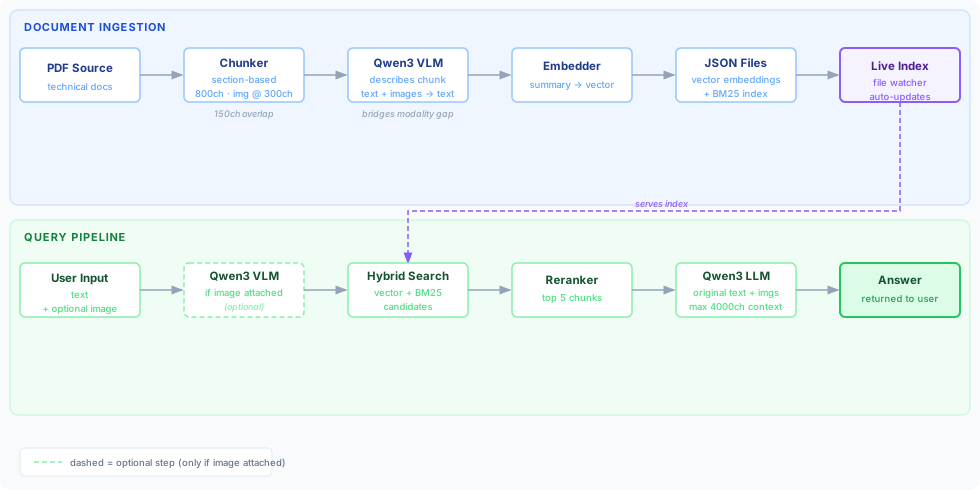
The ingestion stage starts with section-based chunking. I tried to respect the structure of the document instead of blindly splitting on character count, so related content stayed together. Each chunk ended up around 800 characters with 150 characters of overlap, and images were folded in with a weight of roughly 300 characters each.
Once I had a chunk — text, images, or both — I sent it through Qwen3, an 8 billion parameter vision language model, and had it produce a natural-language description of everything in that chunk. That description is always text, regardless of what the source chunk contained. So whether the original content was a paragraph, a wiring diagram, or a table of specs, the output was a text summary of the meaning, and that summary was what got embedded into the vector database.
This bridges the modality gap cleanly. When a user asks a question, their query also goes through the same process: if they attach an image, that gets described too, and the resulting text embedding is compared against a database full of text embeddings that were themselves generated from images. Apples to apples.
Hybrid Search and Index Management
Each ingested PDF produced two output files: a vector file containing the chunk embeddings (from the VLM-generated summaries) and a BM25 index for keyword search. The final search used both, because hybrid search consistently outperforms either approach alone — vector search handles semantic similarity, BM25 catches exact term matches that pure embedding search sometimes misses.
The source directory was organised so that top-level subfolders corresponded to logical groupings, like separate projects or equipment categories. This let users filter their queries to specific subsets of the documentation — "only search within project seven's PDFs" — without any database-level complexity.
Index management was handled by a file watcher that ran alongside the server. The design goal was that a future database administrator shouldn't need to understand anything about the system internals to maintain it. You want to remove a document? Delete the PDF. The watcher detects it, removes the generated JSON files, and updates the live index. You want to force a reprocessing of a document? Delete the JSON files and the system regenerates them on the next run. No admin interface, no scripts to run, no database queries.
When the server started it compiled a fresh index from everything in the source directory. The file watcher kept that index current during runtime. It ended up being one of the simpler parts of the system to explain to people who weren't engineers.
Retrieval and the Final Answer
When a user sends a query, the system generates an embedding of their query (running it through the VLM if images are attached), does a hybrid search across the index, passes the candidates through a reranker service, and takes the top five results. Those top five chunks — their actual source text and images, not the summaries — get fed into the LLM alongside the original user query to produce the final answer.
One thing that took some tuning was the total context budget. Local models have a practical limit on how much context they can handle before quality degrades, so I capped the total context fed to the final LLM at 4,000 characters, with each image counting as 300. That number wasn't arbitrary — it was where RAGAS evaluations started looking consistently good.
The RAGAS Story
The baseline pipeline was honestly kind of bad. Having RAGAS set up early is the only reason I was able to improve it at all. Without a reliable eval loop, I would have been poking at things and not really knowing what was helping.
The metrics told a specific story. Context retrieval — whether the right chunks were being found — was above 90% even with 500+ PDFs in the index. Faithfulness hovered around 80–85%. The stubborn number was answer relevancy, which measures whether the system actually answers the question rather than hedging or saying "I don't know." That started around 60% and improving it was the main focus for the rest of the project.
The process was a lot of trying things and seeing what actually moved the numbers. A lot of things didn't. Upgrading the VLM from Qwen3 8B to 32B gave maybe a two percent improvement in answer relevancy. Tweaking the system prompt was hit or miss — maybe a percent or two if you were lucky, but if the prompt was already decent, there wasn't much to squeeze out of it. Neither of those turned out to be where the leverage was.
What the eval loop was actually good for was ruling things out quickly. Without it, I would have spent time chasing model size and prompt engineering as though they were the main variables. They weren't.
It also caught subtler breakages. At one point my scores dropped sharply across nearly every metric and I couldn't figure out why. Eventually I traced it back to the server response truncating the retrieved context to 200 characters before passing it to the evaluation harness. RAGAS needs the full context to assess faithfulness and relevancy — give it a 200-character snippet and it assumes your answer is ungrounded. The fix was one line, but without the eval in place that kind of quiet regression is almost invisible.
One practical difficulty with RAGAS is that it multiplies your LLM call count by roughly five — evaluating 100 questions means 100 calls for the answers and about 400 more for the evaluation metrics. On the local hardware, that meant evaluation runs could take two hours or more. You learn to be deliberate about when to run a full eval and to change only one thing at a time, otherwise you can't attribute a score change to any specific decision.
Things That Were Worth Trying
A few techniques moved the needle in smaller but cumulative ways.
HYDE — Hypothetical Document Embeddings — was one of the more interesting ones to experiment with. Instead of embedding the user's query directly, you first ask the LLM to generate a hypothetical answer to the question, then embed that. The intuition is that a plausible answer looks more like the actual source text than a question does, so it sits closer in embedding space to the relevant chunks. In practice it added a couple of percent to answer relevancy. Not dramatic, but it's the kind of increment that adds up.
I also tried mixed embeddings: rather than embedding only the VLM-generated summary, I blended the summary embedding with an embedding of the original text at a 70/30 ratio. The idea was to keep the image-awareness of the summary while pulling the vector slightly toward the literal source text. It worked fine. The 70/30 split came from Claude Code's default suggestion and seemed reasonable — you don't want to drown the image-derived signal, but a small pull toward the original text doesn't hurt. It contributed a few percent. Whether it would meaningfully change things if removed, I'm honestly not sure.
The pattern across all of these was the same: individually modest, collectively worth it, but none of them came close to addressing the core bottleneck. The real constraint was context window management on the 8B model.
Why Everything Had to Run Locally
The whole project was constrained to run on-premises. No sending PDFs to ChatGPT or any external service — the tech lead made clear that routing internal documents through a third party wasn't going to happen, and I agreed with the reasoning. This wasn't a bureaucratic obstacle; it was a legitimate concern about proprietary technical documentation.
The hardware was a Dell workstation with 128GB of RAM and a powerful CPU with an embedded GPU. It ran the 8B model and while it could fit the 32B model the improvement in the answers was negligible. So I ran the 8B model instead because it was fast enough to be practical, though "practical" takes on a different meaning when RAGAS is in the loop. What would have been a five-minute cloud API call became a two-hour eval run. Everything about the development loop was slower, which is part of why having the evaluation set up correctly — and early — mattered so much.
The Frontend Was Its Own Problem
The client was a WPF application, and the team was using DevExpress components. DevExpress ships an AI chat control, and using it seemed like the obvious choice. In hindsight I'd have been better off building something simpler from scratch.
The control was restrictive in ways that weren't obvious upfront. Images attached by the user didn't render in the chat view. You couldn't save or reopen images from a conversation. Loading saved conversations required content in HTML format rather than Markdown — a detail that surfaced only after I had conversations with multiple turns working correctly in one format and then had to re-examine everything when the loading path expected something different. The expectation had been that a newer DevExpress version would bring new features over time, and maybe it will, but working against the constraints of the current version ate a disproportionate amount of the two months I had.
The core pipeline was the interesting part of the project. The frontend was a reminder that the last mile between a working system and a usable one is often where the friction lives.
What I'd Do Differently Next Time
If I had more time, I would spend less of it chasing small gains from prompts and model swaps, and more of it on the pieces that were clearly bottlenecks once the evals were in place.
- I'd design the evaluation harness and regression checks even earlier, because that was the only reliable way to tell whether a change actually helped.
- I'd treat context budgeting as a first-class problem from the start, since answer relevancy was much more sensitive to that than to bigger models.
- I'd be more skeptical of restrictive UI components up front. The DevExpress chat control looked convenient initially, but it ended up costing a lot of time in the final stretch.
Overall, the project reinforced something I seem to keep relearning: in RAG systems, the interesting ideas matter, but the real progress usually comes from having a solid eval loop and removing the practical bottlenecks one by one.
References
These were the main resources I drew on while building the pipeline:
- TMLS 2025: AI Engineering Workshop Day — hands-on workshop material covering production RAG implementations; this was the primary reference I used to figure out what the pipeline needed.
- Enhancing Technical Documents Retrieval for RAG — presents a framework combining query expansion, contextual summarization, and fine-tuned embeddings for technical documentation retrieval.
- The Ultimate Guide to Chunking Strategies for RAG Applications — practical guidance on trade-offs between chunking approaches, natural boundary splitting, and adding contextual metadata.
- How to Improve RAG Performance: 5 Key Techniques with Examples — covers chunking, reranking, and query transformations with concrete examples.